
LoadPR on Apple Watch
The LoadPR watch app puts the percentage dial on your wrist. Pick a lift, turn the Digital Crown to the percentage your program asks for, and read the weight to load. Tap the weight for the plates on one side of the bar. It is part of the free version.
Your lifts
The watch lists your lifts from A to Z, each with its best single: the heaviest entry you have logged at 1 rep. A lift with no single yet does not appear; log a 1-rep PR on the iPhone and it shows up.
The lifts and the plates come from the iPhone app. The watch keeps the last ones it received, so it does not need the iPhone in your hand at the rack.
The dial
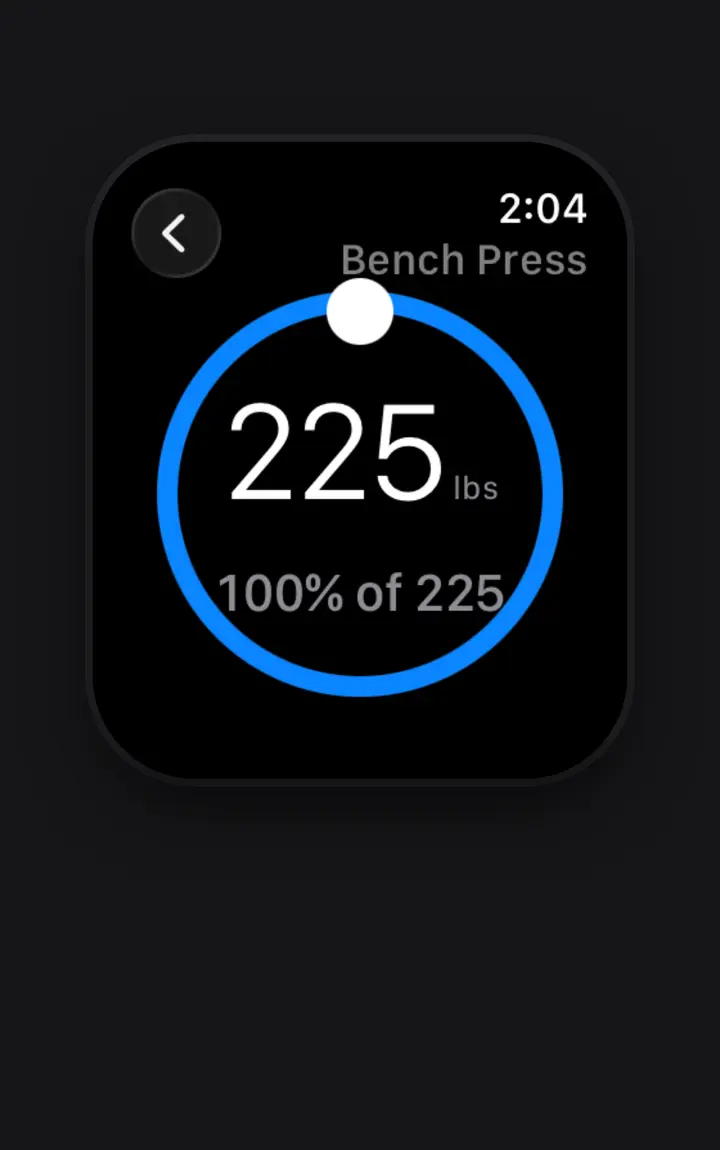
Tap a lift and the dial opens at 100% of its best single. Turn the Digital Crown and the percentage moves in 5% steps, from 50% to 120%, with a click on your wrist at each step. The large number is the weight to load, and the line below it says what it is, such as 100% of 225.
Above 100% the ring and the label turn red, and the watch gives a warning tap as you cross 100%, so an overload set is never a surprise.
Plates on your wrist
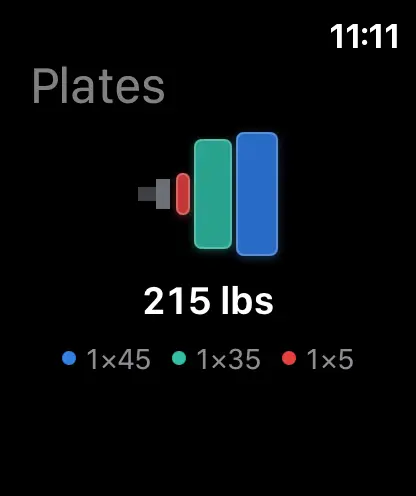
Tap the weight to open Plates. It draws one side of the bar with the plates in their colors, the weight, and a count of each plate, such as 1×45, 1×35 and 1×5. When the weight is the bar alone, it says Just the bar.
For example, 95% of a 225 lb single is 213.75 lb. The plates can't make that, so the watch shows 215 lb, the closest load: one 45, one 35 and one 5 per side.
The same answer as the iPhone
The watch rounds the same way as the iPhone, to the closest weight the plates can make, so both show the same working weight for the same base and percentage. It uses the gym your iPhone has selected: the standard plates in the free version, two of each per side, or your own gym with LoadPR+.
One difference is the base. The iPhone's percentage wheel works from the lift's current PR at any reps; the watch works from the best single. If your heaviest bench press entry is 225 lb for 3 and your best single is 215 lb, the iPhone works from 225 lb and the watch from 215 lb.
Requirements
The watch app needs an Apple Watch with watchOS 11 or later, paired with an iPhone that runs LoadPR on iOS 26 or later. There is nothing extra to buy for it.
When it helps
At the rack, with the phone in a bag or across the room. During percentage work, where the weight changes every set. With chalk on your hands, when a turn of the crown is easier than typing a number.
How to use LoadPR on Apple Watch
- Install LoadPR. Install LoadPR on your iPhone, and make sure the LoadPR watch app is on your Apple Watch.
- Log a single. On the iPhone, log at least one PR at 1 rep for each lift you want on the watch.
- Open the iPhone app. Open LoadPR on the iPhone so it sends your lifts and plates to the watch.
- Turn the crown. On the watch, tap a lift and turn the Digital Crown to your percentage.
- Check the plates. Tap the weight to see the plates for one side.
Free
- The watch app and its dial, 50% to 120%
- Your lifts with their best single
- Plates from the standard lb or kg set, two of each per side
With LoadPR+
- Your own gym's bar and plates on the watch
Questions about this feature
Do I need an Apple Watch to use LoadPR?
No. Everything works on the iPhone. The watch app adds the percentage dial and the plates on your wrist.
Which watchOS does LoadPR need?
watchOS 11 or later, on an Apple Watch paired with an iPhone running iOS 26 or later.
Can I log a PR on the watch?
No. The watch shows your lifts, the dial and the plates. Log PRs on the iPhone, or ask Siri on the iPhone.
Does the watch need my iPhone nearby?
Not for what it already has: it keeps the last lifts and plates it received. New PRs and a new gym reach it from the iPhone app.
Why does the watch dial turn red?
The percentage is above 100% of your best single. The watch also gives a warning tap as you cross 100%.
Does the watch use the same plates as my iPhone?
Yes. It uses the gym selected on the iPhone: the standard set in the free version, your own gym with LoadPR+.