
Gyms, bars and plates
Every answer in LoadPR is built from a plate setup: a bar, the plate sizes and how many of each you can put on the bar. The free version uses the standard set for pounds or kilograms. With LoadPR+ you save a setup for each gym you train in, so the calculator only uses plates that are really there.
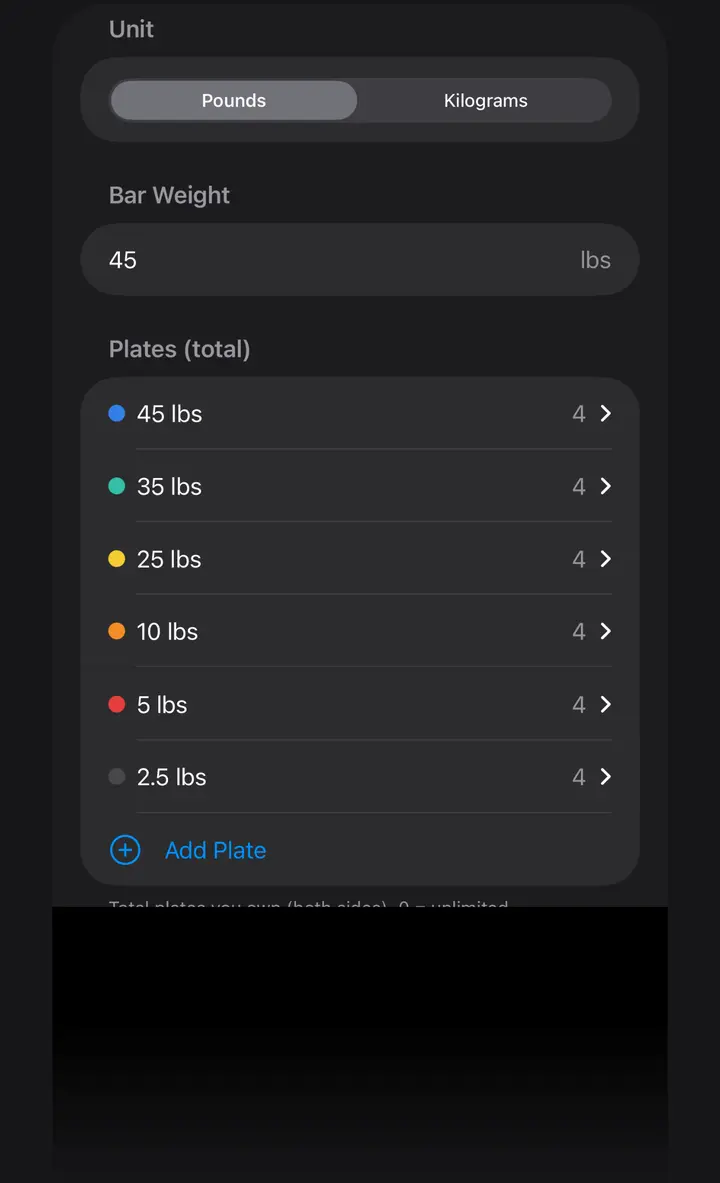
What a gym is in LoadPR
LoadPR calls a plate setup a gym. Each gym has a name, a unit (pounds or kilograms), a bar weight, the plate sizes and how many plates of each size there are. The calculator, the percentage wheel and the Apple Watch all load the bar from the gym that is selected, and its name appears under the plate drawing.
The count matters as much as the sizes. A plate set that can make any weight on paper is no help when the rack has one pair of 45s. LoadPR never draws a plate the gym does not have.
The free setup
The free version comes with two gyms, Standard (lbs) and Standard (kg). Pick the one for your unit. Both have two of each plate per side:
That covers most training: the heaviest exact load is 535 lb with the pound set and 335 kg with the kilogram set. Two of each per side does change how some weights are built. 315 lb is two 45s, one 35 and one 10 per side instead of three 45s, which is the same 135 lb per side.
- Standard (lbs): a 45 lb bar with 45, 35, 25, 10, 5 and 2.5 lb plates
- Standard (kg): a 20 kg bar with 25, 20, 15, 10, 5, 2.5 and 1.25 kg plates
Your own gyms with LoadPR+
With LoadPR+ you add a gym for each place you train: the commercial gym, the garage, the hotel gym on a work trip. For each one you set:
To switch, open Plate Setup and tap the gym. If the gym is in the other unit, the calculator switches to that unit as well, so a kilogram gym never gets pound plates.
- A name, such as Home Gym
- Pounds or kilograms
- The bar weight, for example a 35 lb or 15 kg bar
- The plate sizes, including sizes the standard set does not have
- How many plates of each size you own
- A color for each plate size
Plate counts: the plates you own
In the gym editor, each plate size has the total number of plates you own, both sides together, set in steps of two. Four 45s means two per side. A count of 0 means unlimited and shows as ∞, which suits a commercial gym with a full rack.
LoadPR uses those counts when it builds the bar. Take a garage gym with a 45 lb bar and one pair each of 45, 25, 10, 5 and 2.5 lb plates, and a program that asks for 245 lb. The most those plates can load is 220 lb, one of each per side. LoadPR shows 220 lb with a note that it is the heaviest load these plates allow, and the real target, so you know you are short instead of seeing a smaller number with no warning.
Below that limit, the counts still shape the answer. LoadPR looks for an exact load with the plates you have, and when there is none it shows the closest weight those plates can make.
Bars and other plates
Not every bar weighs 45 lb or 20 kg. Set the bar weight for each gym and every total includes it. With a 35 lb bar and the standard plates, 95 lb is one 25 and one 5 per side. With a 15 kg bar, 60 kg is one 20 and one 2.5 per side.
Add Plate takes any plate weight in the gym's unit, so 15 lb plates or small change plates can be part of the setup. Each plate size has its own color in the drawing, and you can change it to match the plates in your gym.
On Apple Watch
The watch uses the gym your iPhone has selected. In the free version that is the standard set for your unit; with LoadPR+ it is your own gym, with its bar, its plates and its counts. Change the gym on the iPhone and the watch gets the new plates from it.
If LoadPR+ ends
Your gyms are kept. While LoadPR+ is not active, the calculator uses the standard set for the selected gym's unit. When LoadPR+ is active again, your gyms work as before.
How to set up a gym
- Open Plate Setup. On the Load screen, tap the plate setup button next to the percentage wheel. The list shows your gyms, with a checkmark on the selected one.
- Add a gym. Tap Add Gym, give it a name and pick pounds or kilograms. Adding gyms is part of LoadPR+.
- Set the bar. Type the bar weight in the gym's unit.
- Set the plates. For each plate size, set the total you own, both sides together; 0 means unlimited. Use Add Plate for sizes that are not in the list.
- Save and select. Save, then tap the gym in the list to use it. Its name appears under the plate drawing.
Free
- Standard (lbs) and Standard (kg) gyms
- Two of each plate per side
- Switching between the pound and kilogram gyms
- The same plates on Apple Watch
With LoadPR+
- More gyms, one for each place you train
- Your own bar weight for each gym
- Custom plate sizes and plate counts
- Plate colors you choose
- Your own gym's plates on Apple Watch
Questions about this feature
Which plates does the free version assume?
The standard set for your unit, with two of each plate per side: a 45 lb bar with 45, 35, 25, 10, 5 and 2.5 lb plates, or a 20 kg bar with 25, 20, 15, 10, 5, 2.5 and 1.25 kg plates.
How do I tell LoadPR how many plates I own?
With LoadPR+, open the gym in Plate Setup and set the total for each plate size, both sides together. Four 45s means two per side, and 0 means unlimited.
What happens when my plates can't make the weight?
If the target is more than the plates can load, LoadPR shows the heaviest load they allow and a note with the real target. Below that, it shows the closest weight the plates can make.
Can I use a bar that is not 45 lb or 20 kg?
Yes, with LoadPR+. Set the bar weight for each gym, for example 35 lb or 15 kg, and every total includes it.
Can I add plates the standard set does not have?
Yes, with LoadPR+. Tap Add Plate in the gym editor and type the plate weight in the gym's unit.
Can I change the color of a plate?
Yes, with LoadPR+. Each plate size in a gym has a color, and you can change it to match your plates. The drawing and its legend use that color.