
Percentages of your PR
Most programs give the weight as a percentage. In LoadPR you turn a wheel to that percentage and get a weight you can load, with the plates for one side of the bar. The base is the current PR of the lift you pick, or any weight you type.
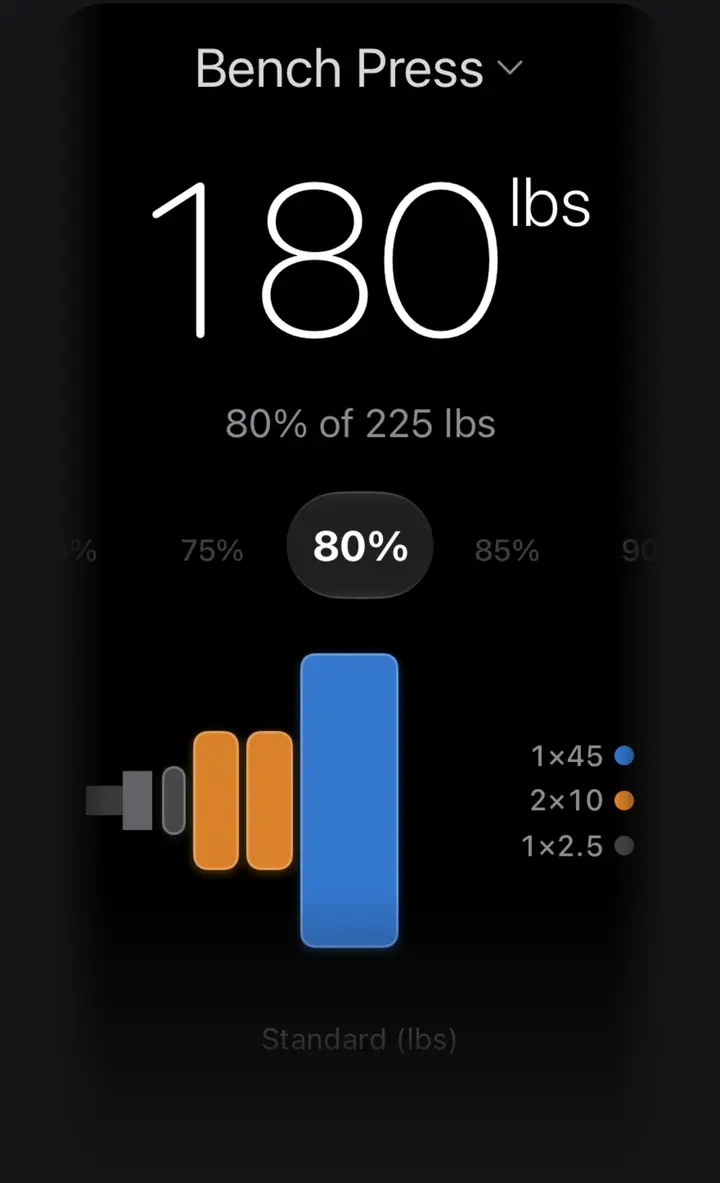
The percentage wheel
Under the weight is a wheel of percentages from 50% to 120% in 5% steps. Swipe it or tap a value and the weight above changes at once, with the plates drawn below it.
The line under the weight says what you are looking at, such as 80% of 225 lbs. The large number is a weight you can load, and the drawing shows the plates for one side.
Values over 100% are there for overload work and for planning a new best. 105% of a 225 lb PR is 236.25 lb, and LoadPR shows 235 lb: two 45s and one 5 per side.
What the percentage is of
When you pick a lift, the base is that lift's current PR: the heaviest weight you have logged for it, at any number of reps. If your best bench press entry is 225 lb for 3, the wheel works from 225 lb.
That is not an estimated one-rep max. LoadPR does not run your sets through a formula before taking the percentage; it uses the weight you actually lifted. If your program is written from a max you tested or estimated, type that number instead.
You can also skip the lift and type any weight. The wheel then works from that number, which is handy for a training max, a coach's number or a friend's lift.
Rounded to a weight you can load
A percentage rarely lands on a weight the plates can make. LoadPR shows the closest weight you can load and the plates for it. On a 225 lb PR with the standard pound set:
There is no rounding setting to choose. The step comes from the plates: 5 lb with the standard pound set and 2.5 kg with the kilogram set. With LoadPR+ the steps follow your own gym's plates.
- 70%: 157.5 lb, shown as 155 lb (one 45 and one 10 per side)
- 80%: 180 lb exactly (one 45, two 10s and one 2.5 per side)
- 85%: 191.25 lb, shown as 190 lb (one 45, one 25 and one 2.5 per side)
- 90%: 202.5 lb, shown as 200 lb (one 45, one 25, one 5 and one 2.5 per side)
Log a PR from the wheel
Next to the wheel is a plus button. Tap it after a set and LoadPR opens a new PR entry with the weight on screen already filled in. Add the reps (1 to 20), the date and a note if you want, and save.
If no lift is picked yet, LoadPR asks you to choose one first. When the new entry is your heaviest for that lift, it becomes the current PR, and every percentage on the wheel moves with it.
On Apple Watch
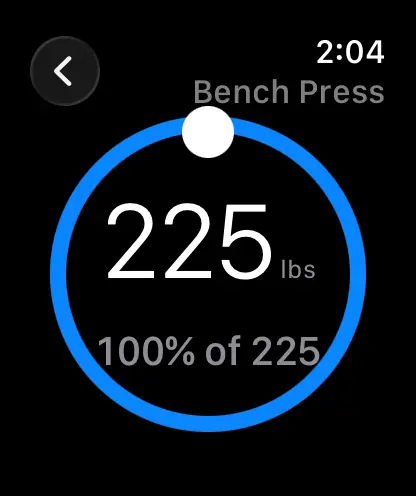
The watch app has the same range. Pick a lift and turn the Digital Crown from 50% to 120% in 5% steps; it opens at 100%. The watch shows the weight to load and the plates for one side.
On the watch the base is the heaviest single you have logged for the lift, that is, your heaviest entry at 1 rep. A lift with no single logged yet does not appear on the watch.
The watch uses the same plates as your iPhone: the standard set in the free version, your own gym's plates with LoadPR+.
Percentages on this website
The 1RM percentage calculator on this website works differently: it builds a full table from a one-rep max you enter, from 100% down to 50%, with a loadable weight for each row. Use it to plan a cycle on a laptop, and the wheel at the bar.
One small difference: when a percentage falls exactly halfway between two loads, the website's table rounds up and the app takes the lighter load. 90% of 225 lb is 205 lb in the table and 200 lb in the app.
How to load a percentage of your PR
- Pick a lift. Tap the lift name at the top and choose the exercise. Its current PR becomes the base.
- Or type a weight. Without a lift, tap the weight and type any base number.
- Turn the wheel. Swipe to the percentage your program asks for and read the weight and the plates.
- Load and log. Load the plates from the drawing, do the set, and tap the plus button to log it as a PR.
Free
- The percentage wheel, 50% to 120% in 5% steps
- Percentages of your current PR or of any weight you type
- Logging PRs for up to 5 exercises
- The same range on Apple Watch, with the Digital Crown
With LoadPR+
- Unlimited exercises
- Weights rounded to your own gym's bar and plates
Questions about this feature
What is the LoadPR percentage wheel based on?
On the selected lift's current PR, the heaviest weight you have logged for it at any number of reps. You can also type any weight and use that as the base.
Are the percentages taken from an estimated max?
No. LoadPR uses the heaviest weight you actually logged. If you want percentages of a tested or estimated max, type that number as the base.
Why does 85% of 225 lb show 190 lb instead of 191.25?
191.25 lb can't be built from the standard plates, so LoadPR shows the closest weight you can load: 190 lb, with one 45, one 25 and one 2.5 per side.
Can I pick 82.5% or another value between the steps?
Not on the wheel: it moves in 5% steps from 50% to 120%. For an in-between value, type the exact weight you want.
Can I go above 100% on the wheel?
Yes. The wheel goes up to 120%, which helps when you plan overload sets or a new PR attempt.
Which lifts appear on the Apple Watch dial?
Lifts with at least one logged single, that is, an entry at 1 rep. The watch uses the heaviest single as the base for its percentages.