
Progress charts
Each lift in LoadPR has a chart of its PRs over time. The blue line is what you actually lifted for a single; the gray line is the estimated one-rep max of your sets of more than one rep. Pick a range from 7 days to all time and touch the chart to read any entry.
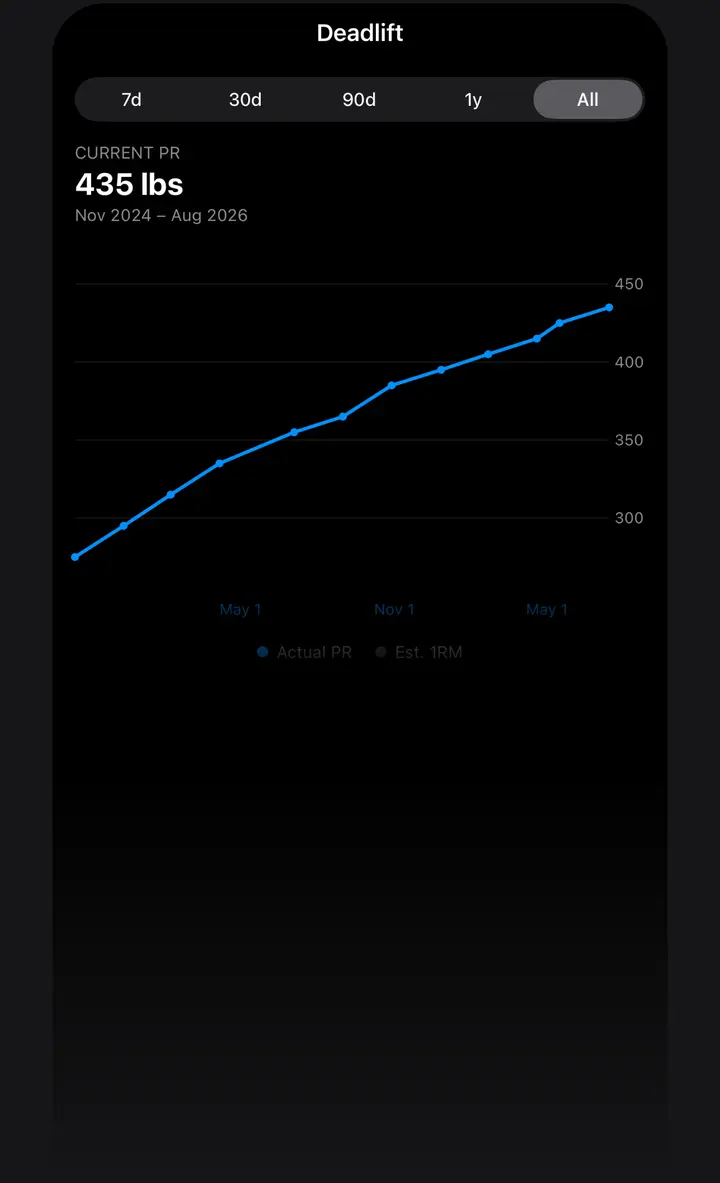
Two lines, one chart
The full chart draws two series. Actual PR is every entry logged at 1 rep, joined by a blue line. Est. 1RM is every entry with more reps, turned into an estimated one-rep max and joined by a lighter gray line. Keeping them apart shows the difference between a max you lifted and a max a formula predicts.
For example, a 225 lb single is plotted at 225 lb on the Actual PR line. A 205 lb set of 5 is plotted at 239.13 lb on the Est. 1RM line, by the app's Epley formula, weight × (1 + 0.0333 × reps). If you pick another formula in Settings, the gray line follows it.
Ranges
Above the chart is a range picker: 7d, 30d, 90d, 1y and All. The chart opens on All. The header shows the best single in the range and the months the range covers, such as Nov 2024 – Aug 2026. If the range only has sets of several reps, the header shows the best estimate instead, marked Est.
If a lift has PRs but none in the range you picked, the chart says there are no entries in this range. Pick a wider range.
Reading a point
Touch or drag across the chart and LoadPR picks the nearest entry, marks it with a line and shows its weight, with the month and year, in the header. Estimated points are labeled Est. Tap an empty part of the chart to clear the selection.
If a lift has entries in kg and in lb, the chart converts them to one unit, the unit of the lift's current PR, so every point shares one axis.
The free mini chart
The free version has a mini chart on the Load screen. When you pick a lift, it shows your last 3 PRs at 1 rep, under the label PR Progress, with the latest weight on top.
Tap it to open the full chart. In the free version, that tap opens the LoadPR+ screen instead.
Progress without opening the app
The Progress Snapshot widget, in the large size, shows your top lifts with their PR trend. On the lock screen, the rectangular Top PR widget shows a PR with its trend.
Ask Siri “Show my Bench Press progress in LoadPR” and it tells you how many PRs you have logged for the lift and your latest one.
What the chart is for
A list of PRs tells you the best number. The chart tells you the direction: a line that climbs every month, a flat stretch that has lasted since spring, or an estimate from your sets of five that is running ahead of your last tested single. That last case is often the moment to test a new single.
How to open a chart
- Log PRs. Log your sets on the lift's page, singles and sets of several reps.
- Open the lift. Tap the lift on the PR tab.
- Tap View Progress. The full chart opens. It is part of LoadPR+.
- Pick a range. Choose 7d, 30d, 90d, 1y or All.
- Read a point. Touch the chart to see the weight and date of one entry.
Free
- Mini chart of your last 3 PRs at 1 rep
- Progress Snapshot and Top PR widgets
- Show Progress with Siri
With LoadPR+
- The full chart for every lift
- Ranges from 7 days to all time
- The estimated 1RM line
- Choice of formula for the estimate
Questions about this feature
What is the gray line on the LoadPR chart?
The estimated one-rep max of your entries with more than 1 rep. The blue line is your actual singles.
Which formula does the chart use for the estimate?
Epley by default. With LoadPR+ you can pick another formula in Settings, and the chart follows it.
Why does my chart say there are no entries?
The lift has PRs, but none in the range you picked. Switch to a wider range such as 1y or All.
Is the progress chart free?
The mini chart of your last 3 singles is free, on the Load screen. The full chart with its ranges and the estimated 1RM line is part of LoadPR+.
Can I chart a lift logged in both kg and lb?
Yes. The chart converts every entry to the unit of the lift's current PR, so all points share one axis.