
PR tracking
LoadPR keeps a list of your lifts with the best weight for each one. Log a PR with its weight, reps, date and a note, and the app keeps the whole history. The current PR then feeds the percentage wheel, and your best singles go to the Apple Watch.
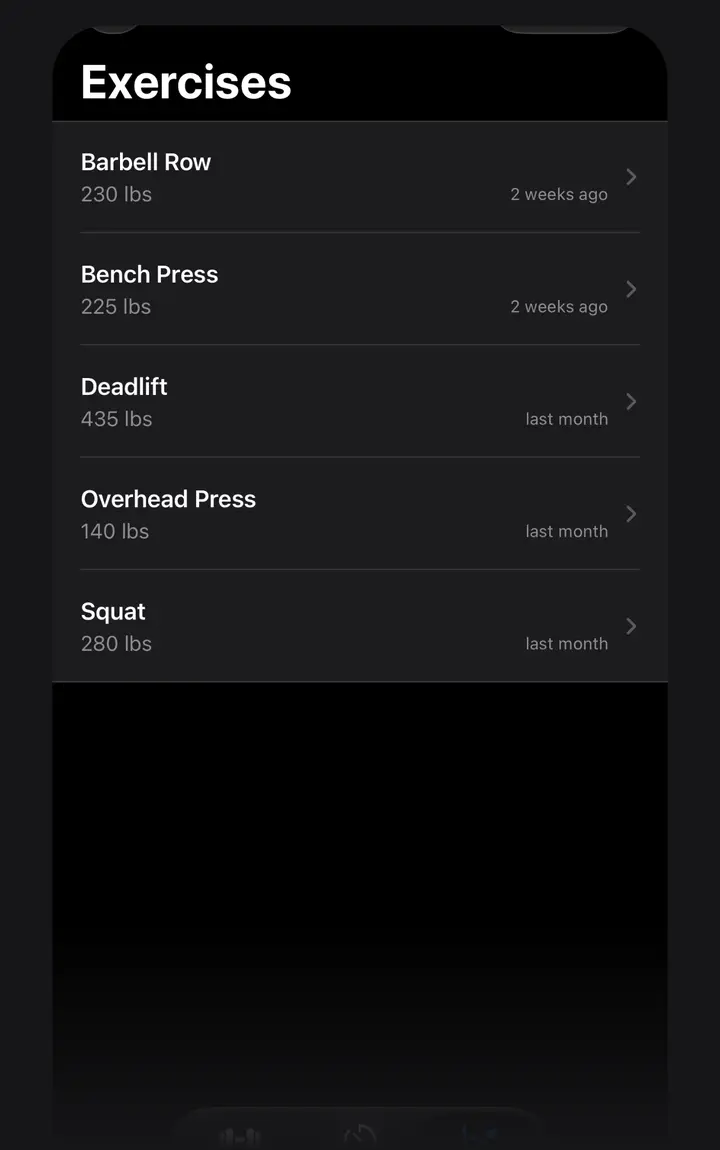
Your lifts at a glance
The PR tab lists your exercises. Each row shows the name of the lift, its current PR and how long ago you set it, such as Bench Press, 225 lbs, 2 weeks ago. Tap a lift to see its PR history, newest first, with the number of entries.
Search the list by name, and sort it by name, by most recent or by heaviest PR.
What a PR entry holds
Each entry has four parts:
Entries can be in different units. LoadPR compares them by their real weight, so a 100 kg single (220.46 lb) counts as heavier than a 220 lb single.
- Weight, in lb or kg
- Reps, from 1 to 20
- Date, today or any earlier day
- A note of up to 200 characters, such as belt, paused or competition
What the current PR is
The current PR of a lift is the heaviest weight you have logged for it, at any number of reps. If your heaviest bench press entry is 225 lb for 3, the current PR is 225 lb. When two entries are equally heavy, the newer one counts.
That number is what the percentage wheel on the Load screen works from, so after a new best every percentage on the wheel moves up with it. The Apple Watch uses a stricter base: the heaviest single, an entry at 1 rep.
Estimated one-rep max
A set of several reps also says something about your one-rep max. LoadPR estimates it with the Epley formula, written in the app as weight × (1 + 0.0333 × reps). 200 lb for 3 reps gives an estimated 1RM of 219.98 lb. A single is its own 1RM.
The estimate appears on the full progress chart, a LoadPR+ feature, as its own line next to the singles you actually lifted. With LoadPR+ you can also pick another formula in Settings. By the Brzycki formula, the same 200 lb triple comes to 211.76 lb.
Three ways to log a PR
On the lift's page, tap + and fill in the entry. On the Load screen, tap the plus button next to the percentage wheel after a set, and the weight on screen is already filled in. Or ask Siri: say “Log a PR for Bench Press in LoadPR”, with the name of one of your lifts, and give the weight.
To fix a mistake, swipe the entry away in the history. Deleting an entry or a lift asks first, and it can be undone by shaking the iPhone.
Free and LoadPR+
The free version tracks up to 5 exercises, and each one holds every PR you log. The list shows how many of the 5 you are using. LoadPR+ removes the exercise limit and adds the full progress chart, CSV export and import, iCloud sync through your own iCloud and the choice of formula.
Widgets and Siri
The widgets show your records without opening the app: Top PR on the home screen or the lock screen, Recent PRs with your three latest records, and Progress Snapshot with your top lifts and their trend. Ask Siri “What's my Bench Press PR in LoadPR” and it answers with the weight and the date.
How to start tracking
- Add a lift. On the PR tab, tap + and name the exercise, such as Back Squat.
- Log a PR. Open the lift, tap + and enter the weight, the reps and the date. Add a note if you want.
- Check the list. The new best shows as the lift's current PR in the list.
- Use it at the bar. Pick the lift on the Load screen and turn the wheel to a percentage of that PR.
Free
- Up to 5 exercises
- Every PR you log for those exercises
- Weight, reps, date and a note for each entry
- Search and sort
- Widgets and the Siri actions
With LoadPR+
- Unlimited exercises
- The full progress chart with the estimated 1RM line
- Choice of 1RM formula
- CSV export and import
- iCloud sync
Questions about this feature
What counts as the current PR in LoadPR?
The heaviest weight you have logged for the lift, at any number of reps. When two entries weigh the same, the newer one counts.
How does LoadPR estimate a one-rep max?
With the Epley formula by default, written in the app as weight × (1 + 0.0333 × reps). 200 lb for 3 reps is an estimated 219.98 lb. With LoadPR+ you can pick another formula.
How many reps can a PR entry have?
From 1 to 20. A single, an entry at 1 rep, is also what the Apple Watch uses as the base for its dial.
Can I log PRs in both kg and lb?
Yes. Each entry keeps its own unit, and LoadPR compares entries by their real weight when it picks the current PR.
How many exercises can I track for free?
Five, and each one keeps every PR you log for it. LoadPR+ removes the exercise limit.
Can I log a PR with Siri?
Yes. Say “Log a PR for Bench Press in LoadPR”, with the name of one of your lifts, and give the weight. If you don't say the reps, LoadPR logs 1.