
Plate loading on iPhone and Apple Watch
Type a weight or pick a percentage, and LoadPR draws one side of the bar with the plates to put on it, each size in its own color. It works in pounds or kilograms, it is free to use as often as you like, and the same answer shows up on Apple Watch.
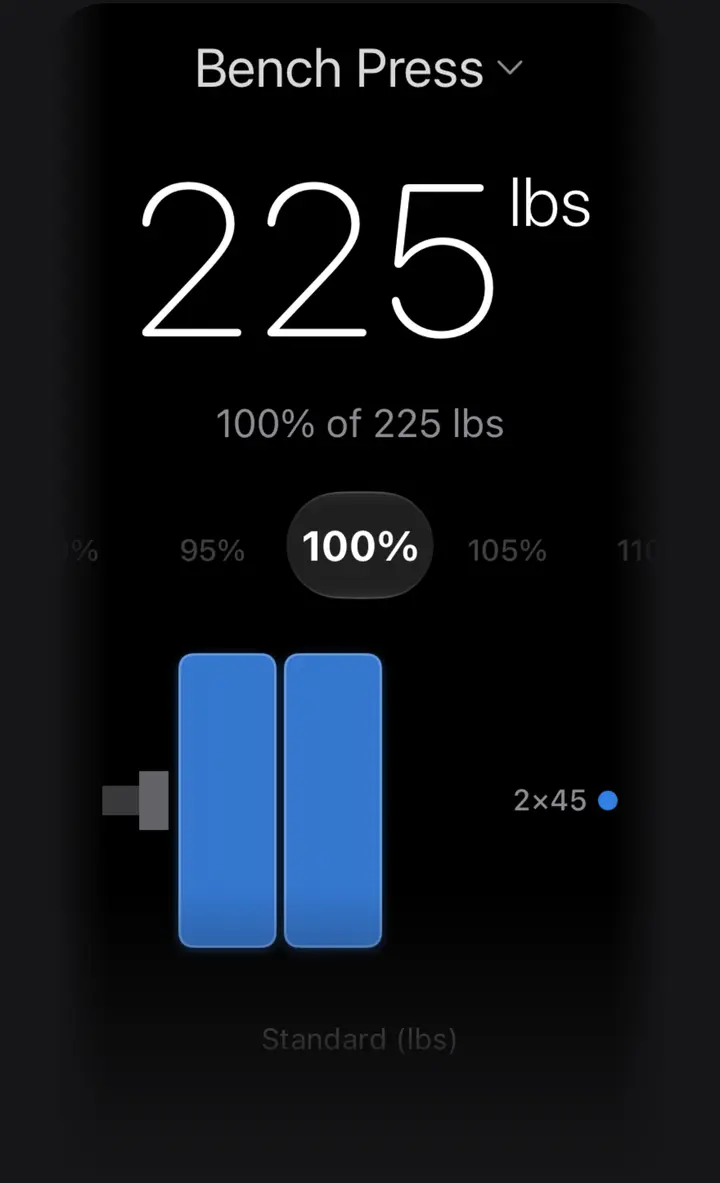
What you see
The result screen has three parts. At the top is the weight you are loading, in large type, with the line that produced it underneath, such as 100% of 225 lbs. In the middle is one side of the barbell: the sleeve, the collar and then the plates, drawn bigger for heavier plates. Beside it is a short legend that counts each plate size, for example 2×45.
That is all you need to load the bar. Put the plates from the drawing on one sleeve, then the same plates on the other. The weight at the top already includes the bar, so 225 lb on a 45 lb bar means 90 lb of plates on each side: two 45 lb plates.
Under the drawing, LoadPR names the plate set it used, such as Standard (lbs), so you always know which bar and plates the answer assumes.
How the plates are chosen
LoadPR takes the weight, removes the bar and splits what is left in two. Then it looks for plates that add up to exactly that amount per side. When more than one set of plates works, it picks the one with the most large plates, which is how most lifters load: big plates first, change plates last.
The search is exact, not a quick guess, and it respects how many plates of each size the set has, so it never draws a plate that is not there. For example, 180 lb on a 45 lb bar is 67.5 lb per side: one 45, two 10s and one 2.5.
Every plate size has its own color, in the drawing and in the legend, so you can match the picture to the rack at a glance. With the standard pound set:
- 45 lb: blue
- 35 lb: teal
- 25 lb: yellow
- 10 lb: orange
- 5 lb: red
- 2.5 lb: gray
Pounds and kilograms
Pick lb or kg in Settings. In pounds, the free setup is a 45 lb bar with 45, 35, 25, 10, 5 and 2.5 lb plates. In kilograms, it is a 20 kg bar with 25, 20, 15, 10, 5, 2.5 and 1.25 kg plates.
For example, 100 kg on a 20 kg bar is 40 kg per side: one 25 and one 15.
The colors follow each plate's place in the set, not a competition color code. In kilograms the 25 is blue, the 20 teal, the 15 yellow, the 10 orange and the 5 red, and the small change plates are gray. The guide to Olympic plate colors below covers the colors used on competition plates.
The free plate set
The free version loads from the standard set for your unit, with two of each plate per side. That covers most training: the heaviest exact load it can build is 535 lb with the pound set and 335 kg with the kilogram set.
Two of each per side changes some answers compared with a gym that has a stack of 45s. 315 lb is three 45s per side when plates are unlimited, but with two 45s per side LoadPR loads it as two 45s, one 35 and one 10. Both come to 135 lb per side.
If a target is heavier than the set can load, LoadPR shows the heaviest load the plates allow and adds a note with the real target, instead of quietly showing a smaller number.
With LoadPR+ you set up your own gyms: the bar, the plates and how many of each the gym has. Every answer then uses the plates that are really on the rack.
When it helps
Between sets, when the next weight is a number on a program and you have a minute and a half to get it on the bar. In a gym you do not know, where the plates are not the ones you are used to. When you train in pounds and the program is written in kilograms, or the other way round.
- A percentage of your PR, picked on the wheel
- A weight from your program that you type in
- A target that the plates can't make exactly, where LoadPR shows the closest load
- The same answer on Apple Watch, with the phone in your bag
On Apple Watch and with Siri
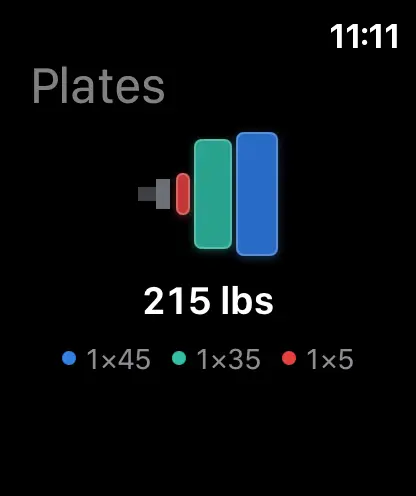
The Apple Watch app shows the same plate drawing and legend for the lift and percentage you pick with the Digital Crown. It uses the plates your iPhone uses: the standard set in the free version, your own gym with LoadPR+.
You can also ask Siri: say “Calculate plates in LoadPR”, give the weight, and Siri reads out the plates for each side. The same action is in the Shortcuts app.
Free to use
The plate calculator stays free. There is no daily limit and no count of how many weights you can load. The free version shows banner ads; LoadPR+ removes them and adds custom gyms, unlimited exercises and the other paid features.
How to load plates with LoadPR
- Install LoadPR. Download LoadPR from the App Store on an iPhone with iOS 26 or later. There is no account to create.
- Pick lb or kg. Choose pounds or kilograms in Settings. The free setup uses the standard bar and plates for that unit.
- Enter a weight. Tap the weight and type the number you want on the bar, or pick a lift and turn the percentage wheel.
- Read one side. Load the plates in the drawing onto one sleeve, largest first, then repeat on the other side.
Free
- The plate calculator, with no usage limit
- The standard lb or kg set, two of each plate per side
- The plate drawing and legend on iPhone and Apple Watch
- The Calculate Plates action for Siri and Shortcuts
With LoadPR+
- Custom gyms with your own bar, plates and plate stock
- No ads
Questions about this feature
Does LoadPR show both sides of the bar?
No. It draws one side, because both sides take the same plates. Load what you see on one sleeve, then repeat it on the other.
Is the bar included in the weight LoadPR shows?
Yes. The large number is the whole bar: the bar plus the plates on both sides. 225 lb on a 45 lb bar is two 45 lb plates per side.
Why does LoadPR load 315 lb without three 45s per side?
The free version has two of each plate per side, so it builds 315 lb from two 45s, one 35 and one 10 per side. That is the same 135 lb per side as three 45s.
Can LoadPR use the plates my gym actually has?
Yes, with LoadPR+. Set up a gym with its bar, its plates and how many of each it has, and every answer uses only those plates.
What do the plate colors in LoadPR mean?
They tell the sizes apart at a glance. In pounds the 45 is blue, the 35 teal, the 25 yellow, the 10 orange, the 5 red and the 2.5 gray. They are not the competition color code.
Can I ask Siri which plates to load?
Yes. Say “Calculate plates in LoadPR” and give the weight. Siri answers with the plates for each side, using the same plates as the app.